🛠️ Attendees Import Fix

We’ve fixed an issue in the attendees import process 🎉. Previously, when names contained unusual or “weird” characters, the import could fail and stop the process. Now this has been resolved ✅.

You can import attendees seamlessly, no matter the characters in their names. Smooth and reliable importing is back on track! 🚀

🎟️ Wallet Pass Display Fix

We’ve fixed an issue affecting wallet passes on iOS and Android 📱. Previously, some text was overflowing and not displaying properly, making the passes harder to read. Now everything fits perfectly within the design, ensuring a clean and professional look ✨. Your attendees will enjoy a smoother experience when adding their passes to their wallets! 🎉

🔍 New Search by Birthdate in Attendees Index

We’ve added a brand-new search field to the Attendees Index page! 🎉 Now, in addition to names and other details, you can search attendees by their birthdate.

This makes it easier to filter, find, and organize participants with greater precision 🗓️.

Another step towards making attendee management smoother and faster for you! 🚀

🎨 Refresh on Activities UI

We’ve given the Activities Module a complete makeover! 🚀 This fresh redesign makes it easier than ever to create, edit, and manage activities at your events. With a smoother flow, faster performance, and a cleaner look, you’ll save time and enjoy a more intuitive experience ✨.

👉 Please note: This update applies only to new events.

We’ve fixed an important issue in the On-Site App! 🎉

Previously, when downloading participants’ information, the app could freeze once it reached 100%. This problem has now been fully resolved ✅. You can now download participant info smoothly without interruptions. Thanks for your patience and happy event managing! 🎊

Unlock Stunning Emails with Stock Photos! 🖼️✨

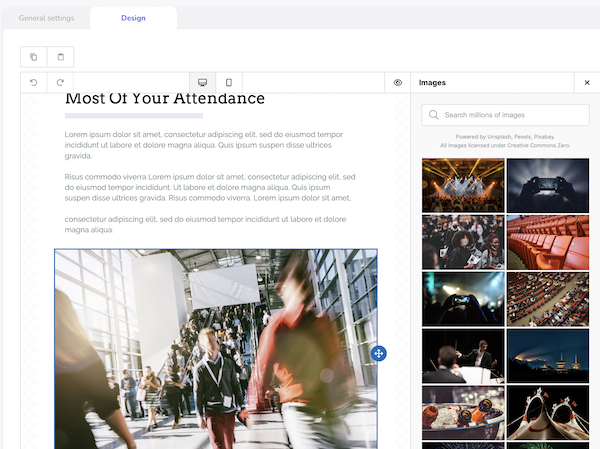
We’re excited to introduce a brand-new stock photo library right inside the massive messages editor!

Now you can easily browse and insert high-quality images into your emails, making your event communications richer, more vibrant, and unforgettable. Say goodbye to plain text—your attendees will love the visual flair! 🎉

New Event Editor Interface 🎉🖥️

Creating and editing events just got an upgrade! We’ve launched a brand-new interface that’s smoother, faster, and more consistent across the platform.

Whether you’re starting from scratch or making edits, you’ll enjoy a cleaner layout and a more seamless experience. 🛠️✨

Give it a try and build your events with ease! 🚀

🇬🇧 New Custom Field: Country Only 🌍📝

Need to keep your registration forms simple? We’ve added a new custom field type: Country!

It lets you ask for the participant’s country only—no need for state, region, or city.

Perfect for quick forms where you just need to know where your attendees are from! 🌎✨

🇬🇧 Smarter Exports, Smoother Experience 🚫📤📤

We’ve added a new safety feature: now, only one data export can be processed at a time per event.

Why? This helps avoid performance issues and ensures your export completes smoothly without delays or crashes. 🛡️💻

Your data exports just got more reliable—no more accidental overloads! ⚙️✨

🇬🇧 Copy, Paste (in massive messages) Done! 🎨✨

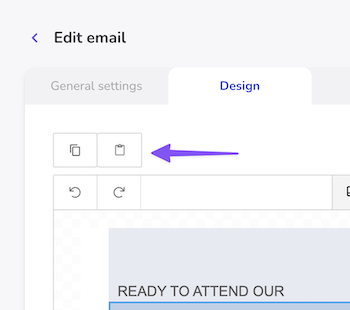
Great news! You can now copy a design from one massive message and paste it into another event—no need to start from scratch anymore! 🙌

This new feature lets you reuse your favorite designs in just a few clicks, saving you time and keeping your branding consistent across events. 🗂️🖌️

Go ahead, give it a try and simplify your messaging workflow! 🚀

🇬🇧 New Look, Same Great Access! 🔐✨

We’ve refreshed the Login and Forgot Password screens to give you a smoother and more delightful experience! 🌟

Whether you’re logging in or recovering your password, you’ll now enjoy a cleaner, more modern interface that’s faster and easier to use.

We’re always working to make your Eventtia journey better—this is just one of many steps we’re taking! 🚀

Badge Creation Bug Fixed! 🎟️✅

We squashed a bug that sometimes caused errors when creating attendee badges. Everything’s now running smoothly — badge away! 🚀

Smooth Mobile Registration, Now Prettier! 📱✨

We fixed some display quirks on the registration success screen for mobile devices. Everything now looks clean and beautiful — just like your events! 🎉

🔄 New Feature: Real-Time Check-In Refresh! 📊

Great update for our on-site app! You can now refresh the attendee count at any activity or checkpoint with just a tap. Stay up-to-date with live attendance numbers as guests check in throughout your event. Perfect for keeping track of capacity and making real-time decisions! ⚡

Small Tweak: Email Now Optional for Speakers ✨✉️

When creating or editing a speaker, email is no longer required. Simple, flexible, and just a little bit easier! 🙌

📱 New Feature: SMS Notifications for Your Guests! 🎉

Exciting news! You can now send SMS messages directly to your event guests right from our platform. Keep your guests informed with instant updates, reminders, and important announcements via text message. This new communication channel will help ensure no one misses out on your amazing events! 🌟

Badge Printing Just Got Smoother! 🖨️🎟️

We’ve fixed a bug that caused errors when printing large numbers of attendee badges with very large images. To prevent this from happening again, Eventtia will now generate PDF files in batches of 200 badges and automatically zip them into one file for easy download. Everything should now work faster, cleaner, and more reliably! 🚀📁

🔍 New Feature: Search Groups by Participant Name! 🚀

Great news! We've added a search feature to the group view that lets you quickly find groups by searching for the main participant's first name or last name. No more scrolling through endless lists - just type and find! This should make managing your groups much easier. 💪

Fix Alert: Attendees View Now Accurate! 🎉

We’ve fixed a small bug where, after accepting or rejecting an attendee, the event view incorrectly showed no more participants. That’s all sorted now — your attendee list stays visible and accurate! ✅

Reorder Your Speakers with Ease! 🔄🎤

When we launched the new Speakers module, we oops! forgot the option to reorganize speakers to match your agenda flow. Good news — the feature is now back! ✨ You can drag and drop to set the perfect speaker order for your event. 🎯

Speakers Module, Reimagined! 🎤⚡

We rebuilt the Speakers module from the ground up — it’s now faster, smoother, and more beautiful than ever. Managing speakers just got way more fun! ✨

🎉 Fixed: Sponsors Module Issue Resolved! ✅

Hey everyone! We've just rolled out a fix for the sponsors module that was causing some leads to get stuck in processing. Everything should now be running smoothly again, and all your leads will be processed correctly. Thanks for your patience! 🙏

📆 Calendar View Just Got Smarter!

We made a couple of helpful tweaks to the activities calendar in the back office:

  • The week now starts on Monday (finally! 😅)
  • The calendar now opens with today’s date selected—no more endless scrolling for long events! 🚀

🌈 Fresh Look Alert: Advanced Registration Settings Revamp! ⚙️

Hey, awesome users! We’ve given the advanced registration settings in the back office a shiny new UI! 🎨 You might not visit this spot often, but we’re sprucing up every corner to make your experience smoother. Enjoy the fresh vibe! 😊

🌐 More Languages for Mobile Passes!

We’ve expanded the language support for mobile passes on both iOS and Android! 📱

Now available in: German, Portuguese, Italian, Catalan, Dutch, Arabic, Vietnamese, Simplified Chinese, Traditional Chinese, Korean, and Japanese. 🌍

🔄 “Save and Re-send” Works Again!

We fixed the issue with the “Save and re-send email” button when editing bulk emails. It’s now working smoothly—send away with confidence! 📬

🆓 Duplicate Event Names? Now You Can!

We used to block events with the same name—our bad! 🙈 After hearing your feedback, we’ve lifted that restriction. Feel free to create as many events with the same name as you need! 🎉

🔍 Smarter, Simpler Event Filters Are Here!

We heard you—the new event index filters were a bit confusing (oops 😅). We’ve cleaned things up! Now, by default, you’ll see ongoing and upcoming events first. Much smoother! 🚀

Changed to this:

🌍 Go Global: New Website Languages Available!

You can now create event websites in even more languages: German, Portuguese, Italian, Catalan, Dutch, Arabic, Vietnamese, Simplified Chinese, Traditional Chinese, Korean, and Japanese. 🗣️

This helps you reach attendees in their native language and makes their registration experience smoother than ever! 🎉

🐞 Bug Fix: Sponsors Now Showing on Virtual Stage!

We squashed a bug that was preventing some sponsors from appearing on the virtual stage. 🛠️ Everything’s back to normal—your sponsors will now display as expected! 🎉

🗑️ Back and Better: Delete Attendees from the Index!

We’ve re-added the delete participant option directly in the contextual menu on the attendees index. No need to click into each participant’s details anymore—just delete right from the list! 🚀 Save time and keep things simple.

📱 New: Phone Field When Importing Guests!

We’ve added the ability to include a phone number field when importing your guest lists. This small but mighty improvement makes it much easier to send SMS messages and keep in touch with your attendees in more ways! 💬📲

✉️ Fix & Resend Bounced Emails—Easier Than Ever!

Typos happen! Now, when an email bounces in a bulk send, you can edit it directly from the report and resend right away—no need to create a new campaign. 🎯 Smooth and simple!

📬 Alternate Emails Now Get All the Info Too!

If you’ve been using the alternate_email field, you may have noticed attendees weren’t receiving platform emails there. We heard you—and fixed it! Now, all communications go to both the primary and alternate email. ✅

🚀 Webhooks Configuration Made Easy

We’re excited to improve the configuration of Webhooks — a powerful feature designed to supercharge your integrations and automate your workflows in real-time.

🔗 What Are Webhooks?

Webhooks allow your systems to receive real-time updates whenever something important happens in our platform. Instead of constantly polling for data, you can now subscribe to specific events and get instantly notified the moment they occur.

🧩 Why this matters for Integrations?

💡 Real-Time Communication**

Webhooks provide a seamless way to sync data and trigger actions across systems — instantly. No delays, no polling, no manual refreshes.

⚙️ Smarter Automation**

Build powerful automations: update CRMs, trigger notifications, sync attendee data, or kick off post-event workflows — all the moment something changes.

🔒 Secure & Scalable**

Each webhook is delivered securely, with signature verification and retry logic to ensure reliability and data integrity.

🌐 Infinite Integration Possibilities**

Whether you’re connecting to internal tools or third-party services like Slack, HubSpot, or Zapier — webhooks are the glue that makes it all work together.

🎯 Use Cases

  • Notify your internal systems when a new event is published
  • Sync attendee registration data to your CRM
  • Trigger external workflows when an event is updated or cancelled
  • Send real-time alerts to your team via messaging platforms

**🛠️ Developer-Friendly** With a simple configuration UI, clear documentation, and support for custom payloads, getting started with webhooks is fast and easy — no heavy lifting required. To access and configure your event Webhooks, just go to your events settings and click on the "Webhooks" tab.
🎉 Event Settings: Upgraded & Redesigned

We’re excited to announce the launch of our newly upgraded and redesigned Event Settings menu in Eventtia's back office—built to make editing and managing events faster, easier, and more intuitive than ever before.

✨ What’s New?

🔄 Streamlined User Experience**

The interface has been reimagined with a clean, modern layout that reduces clutter and prioritizes the most used fields.

⚡ Improved Performance**

Enjoy faster load times, smoother interactions, and an overall snappier experience as you navigate and update your event details.

🔧 Product Update: Mobile Pass Visibility Fix on Confirmation Screen

We’ve fixed an issue where mobile passes were displayed on the event registration confirmation screen for all participants — even those requiring validation. Mobile passes will now only appear when appropriate.

🔁 Multiple Check-Ins Now Allowed at Access Points

We’ve removed the check-out requirement for multiple check-ins at access control points. (checkpoints)

Previously, a participant needed to check out before checking in again. Now, attendees can check in as many times as needed — no check-out required.

📊 Participant Charges Now Included in Excel Export

We’ve fixed an issue where participant charges were missing from the Excel export.

With this update, all participant charges are now properly included in your exports — making your reports more complete and accurate.

🎟️ Wallet Passes Automatically Enabled for New Events

We’ve made it even easier to deliver mobile passes to your participants!

Now, when you create a new event, wallet passes will be enabled by default. This means participants will automatically receive their mobile passes (for iOS or Android) upon registration — no extra setup needed!

🔐 Product Update: Permission Bug Fix on On-Site App

We’ve fixed a bug on the on-site mobile app that allowed users to update participant information without the proper permissions.

Please make sure to update your app to the latest version to ensure secure access and accurate permissions. ✅

🔍 Product Update: Case-Insensitive Search for Event Activities

Searching event activities just got easier! We’ve fixed an issue where the search was case sensitive — meaning searching for “Workshop” and “workshop” gave different results.

Now, your search will work regardless of capitalization. ✅

🧑‍💻 Open Participant Info in New Tabs

Good news! You can now open participant details from the index page in new tabs or windows.

Previously, everything had to be done in the same window — making multitasking tricky. With this update, you’re free to open as many participants as you need in separate tabs.

💳 Smarter Statement Descriptors with Stripe

We’ve improved the way your event charges appear on participants’ credit card statements when using Stripe as your payment processor! ✨

If your event name contains only Latin characters, it will now appear as the statement descriptor. Otherwise, it will show as “Event reg Eventtia.com”.

This helps participants recognize the charge and reduces the chance of payment disputes.

📦 Attendee Exports: Now Faster & More Reliable

We’ve optimized queries, added data validation in cache (instead of hitting the database directly), and made several backend enhancements to ensure faster, more reliable exports. ✅

Global Dashboard loading issue

We’ve resolved a bug affecting the Global Dashboard, ensuring proper load and more reliable experience for all users. ✅

To enjoy the optimized version, simply refresh your web browser.

Thank you for your patience and feedback.

Exciting Update: A new Mass Email Editor is here 📩

We’re thrilled to introduce Eventtia's brand-new Mass Email Editor.

A game-changer solution for creating professional, engaging, and fully customizable emails! ?

Unlike traditional editors, Eventtia's solution provides

✅ Drag-and-drop simplicity – Build emails effortlessly, no coding required

✅ Full-design control – Customize structure, colors, and branding with ease

✅ Mobile & email client optimization – Ensure perfect rendering across all devices

✅ Advanced personalization – Make your emails more dynamic and impactful

This upgrade means better communication, stronger engagement, and smoother workflows—all in just a few clicks! ✨

Try it now and elevate your email game! ??

New Feature: Mobile Passes for event attendees

We’re excited to announce a new way to enhance your attendees’ experience—you can now send mobile passes directly to their phones 💳.

Attendees can now receive and store their event passes on:

✅ Apple Wallet (iOS).

✅ Google Wallet (Android).

This makes event check-ins smoother, faster, and more convenient—no need to print or search for emails! Just tap, scan, and go!

Start sending mobile passes today and simplify the attendee experience! ?✨

Product Update: More flexibility in managing attendee registrations

Great news! Within an event, you now have the option to remove the email restriction, allowing participants to register multiple times with the same email ✅

This update gives you:

  • More flexibility in managing different attendee types and roles.
  • Easier group or team registrations without needing unique emails.
  • A smoother registration process for returning participants.

You can enable this option in your attendee type settings (email field in registration form) and adapt registrations to your needs.

Try it out today and make registrations more seamless than ever 🚀

More flexibility for attendee types configuration

We’re excited to introduce a new improvement that gives you more flexibility when managing attendee types, in Eventtia's Back-Office.

You can now use the same Attendee Type's Name, multiple times, within the same event—no more restrictions on unique names ✅.

This update makes it easier to:

  1. Organize your attendees more efficiently.
  2. Create variations of the same type without extra work.
  3. Customize your event structure to fit your needs.

Enjoy a more seamless attendee management experience and create events with greater ease.